Posts

X3: Renuion and Linux - A match made in Heaven.... I Mean Space

Image
Do you like being a space pirate pillaging your way across the universe? Maybe you are more the entrepreneurial type who wants to establish economic dominance instead. Or do you just want to be a space cowboy smuggling contraband from one world to another. If so, X3: Reunion is the game for you. Released in 2005 by Egosoft, X3: Reunion is an open-world space simulation that allows you to play the game your way. When you start a new game in X3: Reunion, you are presented with several choices. One of which is to play the game's campaign, and the other choices allow you to play the game outside of the campaign. Whichever choice you make, the ultimate journey you embark upon is entirely up to you. For first time players, I suggest at least starting the main campaign. This will allow you to get comfortable with the game world and controls before you strike out on your own. This is because the main campaign of X3: Reunion feels like one long tutorial. The story slowly unfolds as you c...

My Journey Through Linux: A Tale of Learning and Fun

Image
I am a tinkerer. Especially when it comes to computers. No more so than in my early days of computer usage. At the time, I would spend hours typing in Basic programs from magazines into an Atari 800 and later an Apple IIe. Only to end up troubleshooting syntax errors because of my poor typing skills. Little did my 8 year-old brain realize that I was learning not only how to troubleshot computer problems properly, but gaining a passion that has followed me ever since. When I built my first computer in 1996, a Pentium 200 with 16mb of RAM running Windows 95, this need to tinker came back with a vengeance. Soon afterwards, I heard about this operating system called Linux. At the time, I did not give it much thought because I was content creating custom boot menus to maximize the performance I getting on the games I was playing. However, Linux remained in the back of my mind, and in 1999 when on a trip to New York City, I purchased a retail copy of SuSE Linux 6.1. Little did I know that th...

Advanced Kodi: Custom nfo Files

Image
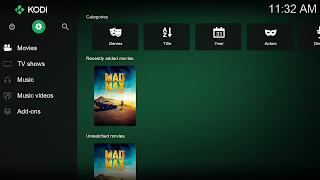
In order to use Kodi, you need to add media into its library. Sometimes when you add media to your library, the information displayed is incorrect or the media doesn't scrape at all. As discussed previously, this can be fixed by using a simple nfo file. Sometimes, even with this basic nfo file, the media doesn't scrape properly or it is not even added to your library. This can be fixed by using a more advanced version of the same nfo file. These files contain the information necessary for Kodi to add media to its library. These files can be especially useful for adding custom videos such as home videos to your Kodi library. In order for Kodi to read the information in these files, it needs to be in an XML data format. This uses "tags" to tell Kodi what type of data the information is. For example, the "title" tag will tell Kodi the title of the video. Because an nfo file can contain different information depending on the type of file being added, I will disc...

Configuring a Remote Control for Kodi

Image
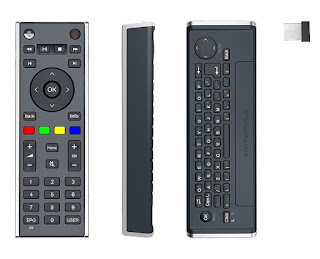
Since the early days when people started to connect a PC to a TV, the question of "how do I control it?" has been asked. During that dark time, around 2002, many of us ran a set of extra long USB cables to a keyboard and mouse that sat on our coffee table. If you had a little more money, you had a wireless keyboard and mouse. Soon Microsoft released a version of Windows XP called the "Media Center Edition" that came with a remote control. While this was a step forward, this remote control required that you use Microsoft developed media programs. Configuring it to work with non-Microsoft programs such as Kodi was complicated and not always reliable. As these home-built Home Theater PC's became more popular, companies started to make a wireless mini keyboards with a laptop type track pad. While these worked great, it tended to be intimidating to use for non-computer users. Why? Too many buttons and it did not look like it belonged in the living room. In 2011, Moto...

Gaming on Linux ala May 2014

I know that I promised an article on configuring a remote control in Kodi, but my laptop recently crashed. My laptop is where I test out my Linux instructions. So it will be a while. In the interim, here is an article I wrote back in 2014 about gaming on Linux. Enjoy! I absolutely love Linux. What is not to love. It is free, maintained by the community of users, secure, can run on old hardware and is fast! These same attributes also are its greatest weaknesses. For example, since it is maintained by the community, there are so many distributions (distros) to choose from. This can be confusing to a new user. Sometimes functions just do not work "out of the box" as advertised, and require some work in the Terminal, think Windows Command Line, to fix. Where Linux's attributes really let it shine and sometime let it down is in the world of gaming. I have managed to play several Windows games on Linux with some minor tweaking. Some games that no longer run on modern systems,...

Kodi and the Disappearing Text - Tweaking Kodi to display English and non-Latin characters together

Image
In previous posts, we discussed the basics needed to get Kodi up and running from scratch. While Kodi works well out of the box, some tweaking is involved to use it to its fullest potential. One thing I really like about Kodi is that it is available in multiple languages. The interface and many of the official add-ons have been translated by the community into languages other than English. While displaying Kodi in your native language is great, the problem comes when you try to mix languages. This is especially evident when you try to mix languages that do not use the same style of alphabet such as English and Japanese. Kodi will display the non-Latin characters of the Japanese language as either boxes or gibberish. Since I live in a multi-language household, Thai and English, tweaking Kodi to display non-Latin characters, whether in media titles or subtitles, is a must. The reason why Kodi will not display languages such as English and Chinese together properly is due to fonts. Font...