Posts

Showing posts with the label How-To's

Manjaro Deepin Community Edition - Four Months Later Including Some Fixes and Customizations

Image
Hello again from the Nut Hutch. I must apologize for my lengthy absence. The reasons for this absence are why I call my domicile the "Nut Hutch". For example, in the last couple of months, I have started to learn to speak, read, and write Thai. Meanwhile, the wife started a new job that keeps her busy for a longer period of time. Then the pièce de résistance, the LCD Screen, keyboard, and the SSD in my laptop all decided to die in a cascade of failures that would have been funny if the repair parts were not so expensive. Because my laptop was never sold in Thailand, I had to import the LCD Screen and Keyboard from overseas. Finally, after a month and a half of waiting, the parts arrived and I was able to effect the needed repairs. Needless to say, the laptop is now back in fighting shape. Replacing the SSD in the laptop meant that I needed to reinstall Manjaro Deepin Community Edition (Manjaro Deepin CE). Since I regularly backup my home folder, I did not loose any data. Even...

Rebuilding My Home Media Server

Image
In a previous post, link , I talked about my home media server. Since that post, the server described decided to take a permanent vacation. Since its departure was sudden and surprising, it will be sorely missed. The journey required to replace it was both fun and frustrating. It also gave me an opportunity to teach my wife a little bit about how computers are made. Since every journey begins with a step, let us take the first one together. The server was running perfectly as I was applying a security patch. Upon reboot however, the system decided that it did not want to post. After some troubleshooting, and removing one stick of RAM, the system was able to boot. While this was a step in the right direction, it was not a solution. Withing five minutes, the system would freeze and require a hard reset. After the hard reset, the system would not post. So some more in depth testing was needed. In order to this testing, I needed another system that used DDR3 for RAM and used the LGA-115...

Fixing an Over Heating Android TV Box

Image
I must apologize for the lack of content lately. In the last month I had problems with my Android TV in the bedroom overheating and then my home server decided to go on a permanent vacation. The server was an easy fix, but the Android TV took some time. Today, I would like to talk about my Android TV fix. While the solution I came up with was not as elegant as it could be, it was fun to do and a learning experience for me. In my previous post link , I talked about my Home Media Center setup. In my bedroom, I stated that I was using a Memobox Q-Box Android TV that I had purchased from Aliexpress, link . This little piece of hardware is pretty good for the price that you pay. The only problem I was having with it was heat. The box would get very hot during use. Hot enough, that the quad-core processor would slow its speed to try and cool itself off. This is called "thermal throttling". Thermal throttling is normal with modern processors. Both desktop and mobile processors use...

Advanced Kodi: Custom nfo Files

Image
In order to use Kodi, you need to add media into its library. Sometimes when you add media to your library, the information displayed is incorrect or the media doesn't scrape at all. As discussed previously, this can be fixed by using a simple nfo file. Sometimes, even with this basic nfo file, the media doesn't scrape properly or it is not even added to your library. This can be fixed by using a more advanced version of the same nfo file. These files contain the information necessary for Kodi to add media to its library. These files can be especially useful for adding custom videos such as home videos to your Kodi library. In order for Kodi to read the information in these files, it needs to be in an XML data format. This uses "tags" to tell Kodi what type of data the information is. For example, the "title" tag will tell Kodi the title of the video. Because an nfo file can contain different information depending on the type of file being added, I will disc...

Configuring a Remote Control for Kodi

Image
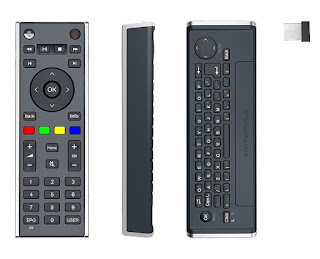
Since the early days when people started to connect a PC to a TV, the question of "how do I control it?" has been asked. During that dark time, around 2002, many of us ran a set of extra long USB cables to a keyboard and mouse that sat on our coffee table. If you had a little more money, you had a wireless keyboard and mouse. Soon Microsoft released a version of Windows XP called the "Media Center Edition" that came with a remote control. While this was a step forward, this remote control required that you use Microsoft developed media programs. Configuring it to work with non-Microsoft programs such as Kodi was complicated and not always reliable. As these home-built Home Theater PC's became more popular, companies started to make a wireless mini keyboards with a laptop type track pad. While these worked great, it tended to be intimidating to use for non-computer users. Why? Too many buttons and it did not look like it belonged in the living room. In 2011, Moto...