Posts

Showing posts with the label Kodi

Setting up Plex to work with a Panasonic Viera HDTV and Kodi Comparisons

Image
Like many people I know, I have a television in my bedroom. In order to watch programs from my Media Server, I have an Android TV attached to it. After playing around with some of the options on the TV, I noticed that I had another option to stream content from my Media Server. Smart televisions from Panasonic and other manufacturers have the ability to stream media from servers that use the DLNA protocol. I was intrigued to see how this protocol worked. Since I needed some DLNA server software, it gave me an opportunity to try out Plex. Little did I know it at the time, but was I in for an interesting ride. Plex and the Panasonic Viera HDTV The first thing I needed to do was install the Plex Server software on my Media Server. This was accomplished quite easily on my Linux Mint 18.2 by using the provided deb file. It installed and configured itself without any noticeable hitches. Since at this point I was just experimenting, I added only one of my media hard drives to the server...

Fixing an Over Heating Android TV Box

Image
I must apologize for the lack of content lately. In the last month I had problems with my Android TV in the bedroom overheating and then my home server decided to go on a permanent vacation. The server was an easy fix, but the Android TV took some time. Today, I would like to talk about my Android TV fix. While the solution I came up with was not as elegant as it could be, it was fun to do and a learning experience for me. In my previous post link , I talked about my Home Media Center setup. In my bedroom, I stated that I was using a Memobox Q-Box Android TV that I had purchased from Aliexpress, link . This little piece of hardware is pretty good for the price that you pay. The only problem I was having with it was heat. The box would get very hot during use. Hot enough, that the quad-core processor would slow its speed to try and cool itself off. This is called "thermal throttling". Thermal throttling is normal with modern processors. Both desktop and mobile processors use...

My Home Media Center Setup

Image
When I talk about Kodi, I often get asked about what hardware I am running it on. So I thought I would take a moment to share with you my Home Media Center. Unlike most people today, I do not stream most of my content from the internet. Most of my content is streamed locally. How I have my computers set up is designed to allow my wife and I to watch content all over the house. If something I am using is still available for purchase, I will add the needed links to their section. Server The server is the heart of any home network. My server is housed in a custom case from Moneual that is designed to look like a DVD player. This allows it to blend in with the other components in my entertainment center. When this case was released in 2010, the Moneual 312 was lauded for its look, internal storage options, and its small size. At the time, most cases for HTPC's were a standard ATX computer cases turned sideways. They were large, bulky, ugly, and they did not have near the internal...

Advanced Kodi: Custom nfo Files

Image
In order to use Kodi, you need to add media into its library. Sometimes when you add media to your library, the information displayed is incorrect or the media doesn't scrape at all. As discussed previously, this can be fixed by using a simple nfo file. Sometimes, even with this basic nfo file, the media doesn't scrape properly or it is not even added to your library. This can be fixed by using a more advanced version of the same nfo file. These files contain the information necessary for Kodi to add media to its library. These files can be especially useful for adding custom videos such as home videos to your Kodi library. In order for Kodi to read the information in these files, it needs to be in an XML data format. This uses "tags" to tell Kodi what type of data the information is. For example, the "title" tag will tell Kodi the title of the video. Because an nfo file can contain different information depending on the type of file being added, I will disc...

Configuring a Remote Control for Kodi

Image
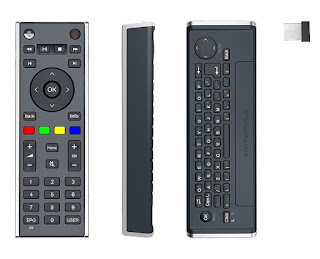
Since the early days when people started to connect a PC to a TV, the question of "how do I control it?" has been asked. During that dark time, around 2002, many of us ran a set of extra long USB cables to a keyboard and mouse that sat on our coffee table. If you had a little more money, you had a wireless keyboard and mouse. Soon Microsoft released a version of Windows XP called the "Media Center Edition" that came with a remote control. While this was a step forward, this remote control required that you use Microsoft developed media programs. Configuring it to work with non-Microsoft programs such as Kodi was complicated and not always reliable. As these home-built Home Theater PC's became more popular, companies started to make a wireless mini keyboards with a laptop type track pad. While these worked great, it tended to be intimidating to use for non-computer users. Why? Too many buttons and it did not look like it belonged in the living room. In 2011, Moto...